The exact protocol path
How systems exchange a request.
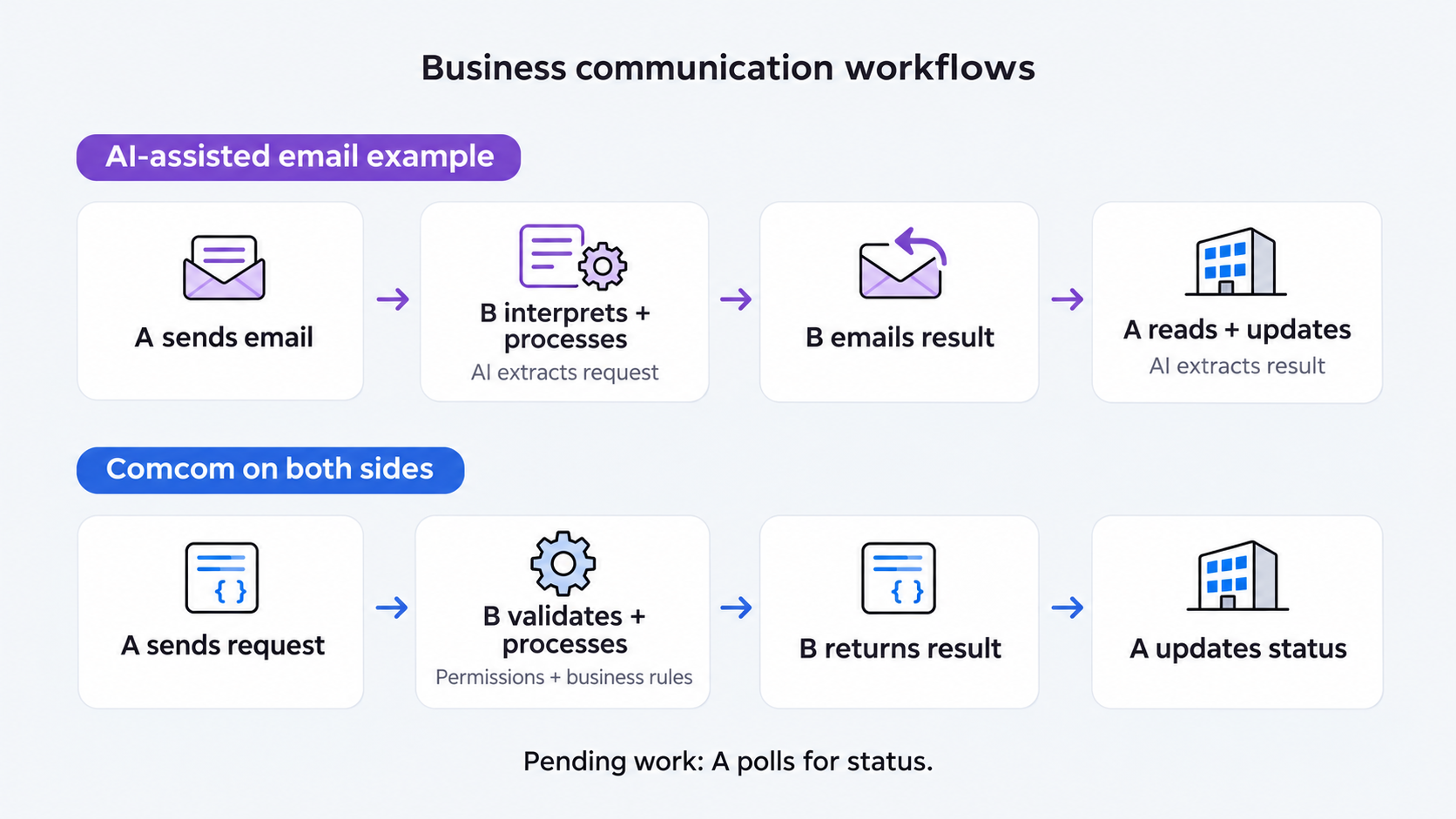
- 01Discover
GET or HEAD RFC 9727
/.well-known/api-catalogover HTTPS. - 02Verify
Load the manifest and digest-verified profile release bundle.
- 03Select
Choose an exact advertised ID, version, direction, kind, and form.
- 04Validate
Bind sender, recipient, endpoint, security, extensions, and typed payload.
- 05Act
Use the correlated structured result or receipt as the authoritative record.
Example: trader and manufacturer
A purchase order starts a manufacturing workflow.
A trader and a manufacturer agree to partner and automate a recurring order process. Each connects its own software to the agreed Comcom capabilities and authorises the other business to use them.
- 01Agree and connect
Both partners agree on products, order details, permissions, and acceptance rules. Developers connect their separate systems.
- 02Send the purchase order
The trader’s software sends PO-1042 for 500 steel brackets to the manufacturer’s software using Comcom.
- 03Check and accept
The manufacturer’s software validates the request and applies its own commercial and capacity checks.
- 04Start manufacturing
Once the order is accepted, the manufacturer’s configured automation creates an internal production job and schedules the work.
- 05Return status
The trader’s software requests order status through Comcom. The manufacturer returns the agreed status from its system.
Comcom is the shared language between the businesses. The manufacturer implements the link from an accepted order to its manufacturing workflow; each partner keeps control of its own system.
Inspect the Comcom purchase-order messages
Illustrative document snapshots using the existing draft comcom.order.create capability. The result confirms creation of a proposed order, not completion of manufacturing. Partner approval and the internal production workflow follow the agreed business rules. These fixed timestamps are for inspection, not live submission.
1. Discovery
{
  "linkset": [
    {
      "anchor": "https://manufacturer.example/.well-known/api-catalog",
      "item": [
        {
          "href": "https://manufacturer.example/comcom/v0.2/manifest",
          "type": "application/vnd.comcom.manifest+json",
          "profile": "https://abhcr.github.io/comcom-protocol/releases/v0.2.0/profiles/manifest",
          "title": "Manufacturer Comcom manifest"
        }
      ]
    }
  ]
}
2. Manufacturer manifest
{
  "protocolVersions": [
    "0.2"
  ],
  "entity": {
    "id": "https://manufacturer.example",
    "type": "organization",
    "name": "Example Manufacturer"
  },
  "roles": [
    "responder",
    "asyncResponder"
  ],
  "serviceOrigins": [
    "https://manufacturer.example"
  ],
  "profiles": [
    {
      "id": "commerce.orders",
      "version": "0.2.0",
      "release": "https://abhcr.github.io/comcom-protocol/releases/v0.2.0/profiles/commerce.orders.bundle.json",
      "sha256": "072947b1373a7deb1173a631853b30ab9a38327890013cab524cade0aab0734f"
    }
  ],
  "securitySchemes": {
    "businessOAuth": {
      "type": "oauth2",
      "flows": {
        "clientCredentials": {
          "tokenUrl": "https://manufacturer.example/oauth/token",
          "scopes": {
            "order:create": "Create orders"
          }
        }
      }
    }
  },
  "capabilities": [
    {
      "id": "comcom.order.create",
      "version": "0.2.0",
      "profile": "commerce.orders",
      "direction": "receive",
      "kinds": [
        "command"
      ],
      "inputSchema": "https://abhcr.github.io/comcom-protocol/releases/v0.2.0/profiles/v0.2/commerce.orders/comcom-order-create/schemas/input.schema.json",
      "outputSchema": "https://abhcr.github.io/comcom-protocol/releases/v0.2.0/profiles/v0.2/commerce.orders/comcom-order-create/schemas/output.schema.json",
      "executionModes": [
        "synchronous",
        "asynchronous"
      ],
      "forms": [
        {
          "href": "https://manufacturer.example/comcom/interactions",
          "method": "POST",
          "contentType": "application/comcom+json",
          "executionMode": "synchronous",
          "security": [
            {
              "businessOAuth": [
                "order:create"
              ]
            }
          ]
        },
        {
          "href": "https://manufacturer.example/comcom/interactions",
          "method": "POST",
          "contentType": "application/comcom+json",
          "executionMode": "asynchronous",
          "security": [
            {
              "businessOAuth": [
                "order:create"
              ]
            }
          ],
          "statusTemplate": "https://manufacturer.example/comcom/interactions/{id}"
        }
      ]
    }
  ],
  "limits": {
    "messageBytes": 1048576,
    "schemaBytes": 1048576,
    "idempotencyRetentionSeconds": 86400,
    "requestsPerMinute": 120
  }
}
3. Purchase-order request
{
  "protocolVersion": "0.2",
  "id": "urn:uuid:28d1eb49-5024-4d98-aa2a-c76f5c822ca5",
  "kind": "command",
  "capability": {
    "id": "comcom.order.create",
    "version": "0.2.0"
  },
  "principal": {
    "id": "https://trader.example",
    "type": "organization"
  },
  "sender": {
    "id": "https://trader.example",
    "type": "organization"
  },
  "recipient": {
    "id": "https://manufacturer.example",
    "type": "organization"
  },
  "agent": {
    "id": "https://trader.example/software/purchasing",
    "type": "software",
    "name": "Trader purchasing system"
  },
  "authorization": "https://trader.example/authorizations/456",
  "issuedAt": "2026-08-17T09:00:00Z",
  "expiresAt": "2026-08-17T09:05:00Z",
  "idempotencyKey": "order-28d1eb49-5024-4d98-aa2a",
  "payload": {
    "capability": "comcom.order.create",
    "parameters": {
      "order": {
        "buyerId": "https://trader.example",
        "sellerId": "https://manufacturer.example",
        "supplierId": "https://manufacturer.example",
        "referenceNumber": "PO-1042",
        "lines": [
          {
            "itemId": "https://manufacturer.example/products/bracket-a",
            "description": "Steel bracket A",
            "quantity": "500",
            "unitCode": "C62"
          }
        ]
      }
    }
  }
}
4. Order-created result
{
  "protocolVersion": "0.2",
  "id": "urn:uuid:036f0c76-41c7-4408-b6fc-742b5a442846",
  "kind": "result",
  "capability": {
    "id": "comcom.order.create",
    "version": "0.2.0"
  },
  "principal": {
    "id": "https://trader.example",
    "type": "organization"
  },
  "sender": {
    "id": "https://manufacturer.example",
    "type": "organization"
  },
  "recipient": {
    "id": "https://trader.example",
    "type": "organization"
  },
  "issuedAt": "2026-08-17T09:00:01Z",
  "correlationId": "urn:uuid:28d1eb49-5024-4d98-aa2a-c76f5c822ca5",
  "payload": {
    "status": "completed",
    "resource": {
      "id": "https://manufacturer.example/orders/789",
      "type": "Order",
      "state": "proposed",
      "revision": 1,
      "createdAt": "2026-08-17T09:00:01Z",
      "updatedAt": "2026-08-17T09:00:01Z",
      "buyerId": "https://trader.example",
      "sellerId": "https://manufacturer.example",
      "supplierId": "https://manufacturer.example",
      "referenceNumber": "PO-1042",
      "lines": [
        {
          "itemId": "https://manufacturer.example/products/bracket-a",
          "description": "Steel bracket A",
          "quantity": "500",
          "unitCode": "C62"
        }
      ]
    },
    "nextActions": [
      "comcom.order.get"
    ]
  }
}
5. Rejected identity
{
  "type": "https://abhcr.github.io/comcom-protocol/releases/v0.2.0/problems/sender-identity-mismatch",
  "title": "Sender identity mismatch",
  "status": 403,
  "phase": "identity",
  "code": "sender-identity-mismatch"
}
Draft profile catalog
201 authored capabilities.
Showing 201 results.
Page 1
The interactive catalog has not loaded. Browse the complete no-JavaScript catalog.
Offline document checker
Paste or upload. Nothing is fetched.
The validator, both pinned manifest profiles, complete examples, and catalog are bundled into this page. It checks raw JSON and document schemas locally. Transport identity, DNS, authorization, and live endpoint behavior require the Node or Python conformance CLI.
Start with existing business partners
Agree on one recurring workflow.
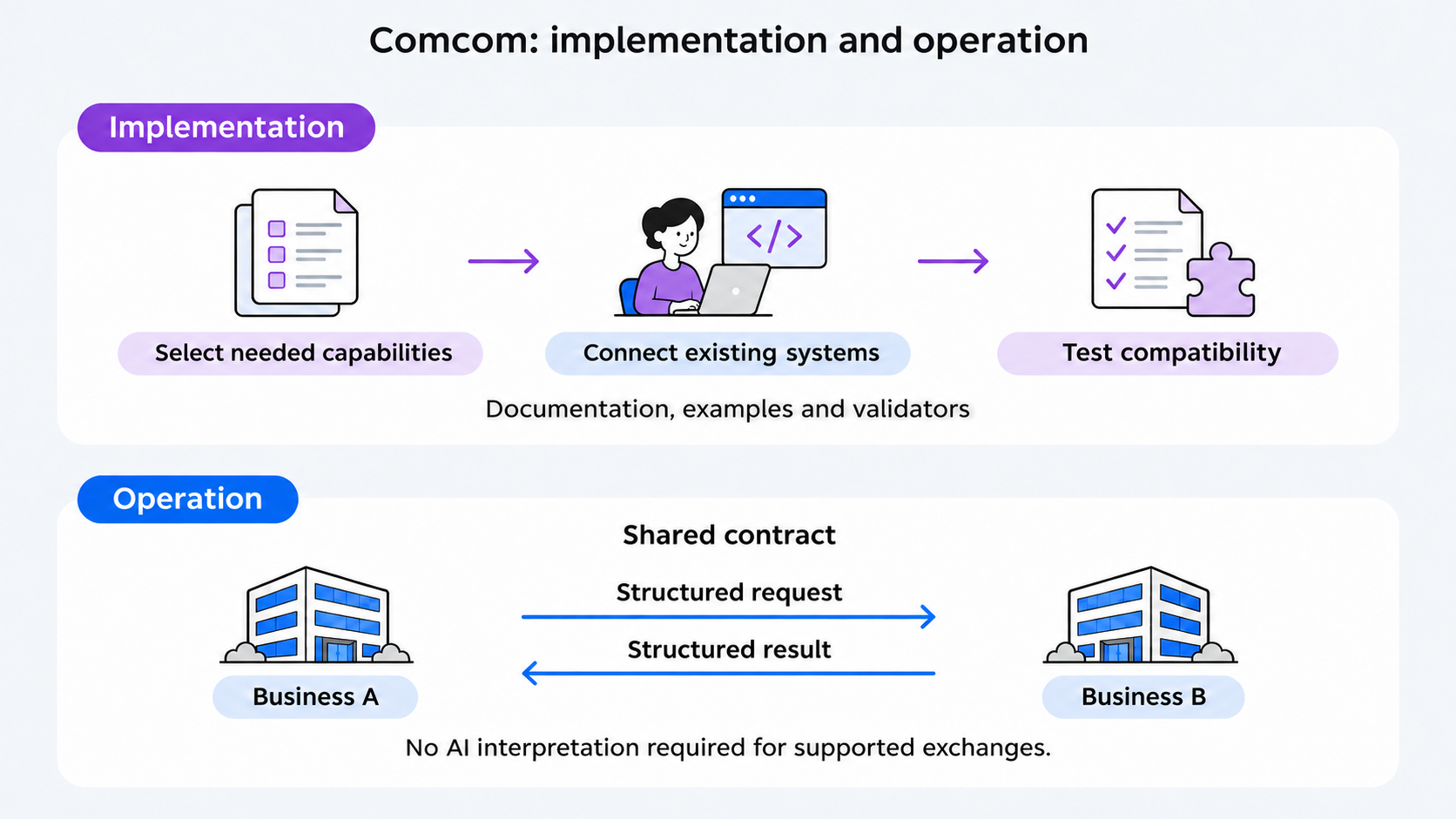
Evaluation can begin with two willing partners; it does not require an entire industry to adopt Comcom first.
Product search → availability → quote → orderPurchase order → acceptance → internal production → order statusOffer or announcement → accepted, discarded, or duplicate receipt
Implement and inspect
Validate your implementation.
node reference/v0.2/cli.mjs request
python reference/v0.2/comcom_validator.py request
npm run conformance:v0.2
Comcom is an open-source community contribution. Help improve it with real business workflows, implementation reports, and protocol feedback.
Fictional example: Example Company illustrates company identity and a contact link through discovery, with no callable interactions. Its URLs are placeholders.